> ## Documentation Index
> Fetch the complete documentation index at: https://docs.penquify.com/llms.txt
> Use this file to discover all available pages before exploring further.
# Introduction
> OCR in reverse. Structured data in, realistic document photo out — with verified ground truth.
# What is Penquify?
> *From Chilean slang **"penca"** (lousy, worse) — because your document photos should look realistically bad, not studio-perfect.*
Penquify is an open-source Python toolkit that takes structured data and produces photorealistic smartphone photos of printed logistics documents — with coffee stains, folds, blur, skew, and every imperfection that makes real-world document processing hard.
**You don't build the PDF.** You give penquify an OC number, a JSON payload, or upload an existing PDF — and it generates the document, introduces realistic discrepancies, renders it, photographs it, verifies every field, and tells you exactly what's occluded.
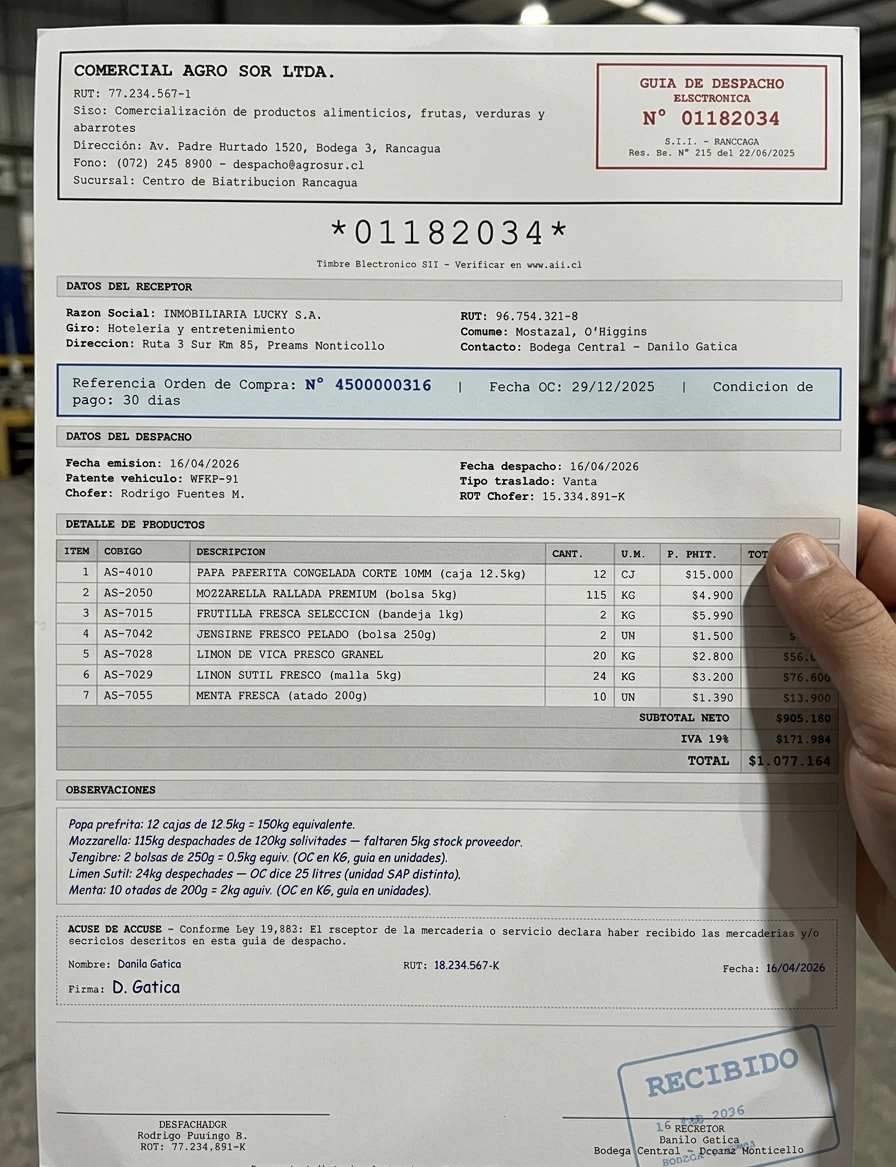 ## The Problem
You're building a vision pipeline — document extraction, agentic workflows, OCR automation. But you have **12 real documents**. You need 1,200 test cases covering blurry, folded, stained, cropped scenarios. And the data in each photo **has to be correct and verifiable** because your agent needs to do downstream lookups.
Scanning the same invoice 50 times doesn't help. Image augmentation (rotate, noise) doesn't produce realistic warehouse photos. And manually photographing documents with different phones, angles, and lighting doesn't scale.
## The Solution
```
ERP purchase order penquify generates penquify generates
(or any JSON/PDF) ──► dispatch guide PDF ──► realistic photos
with supplier jargon, with verified
unit mismatches, ground truth +
realistic discrepancies occlusion manifest
```
JSON payload, uploaded PDF, or natural language description. Penquify generates the document with realistic supplier names, unit mismatches, and quantity discrepancies.
Photorealistic smartphone photos — configurable camera model, paper deformation, stains, blur, angle, glare. 8 presets + infinite custom.
Blind extraction + programmatic comparison. The model never sees the answers. Every field verified. Mismatches trigger retries. Occlusion manifest explains what's hidden and why.
CLI tool, Python library, REST API, MCP server (5 tools for Claude/Cursor), Agent SDK plugin, Docker/K8s deployment.
## Before → After
**Input: Clean PDF (auto-generated)**
## The Problem
You're building a vision pipeline — document extraction, agentic workflows, OCR automation. But you have **12 real documents**. You need 1,200 test cases covering blurry, folded, stained, cropped scenarios. And the data in each photo **has to be correct and verifiable** because your agent needs to do downstream lookups.
Scanning the same invoice 50 times doesn't help. Image augmentation (rotate, noise) doesn't produce realistic warehouse photos. And manually photographing documents with different phones, angles, and lighting doesn't scale.
## The Solution
```
ERP purchase order penquify generates penquify generates
(or any JSON/PDF) ──► dispatch guide PDF ──► realistic photos
with supplier jargon, with verified
unit mismatches, ground truth +
realistic discrepancies occlusion manifest
```
JSON payload, uploaded PDF, or natural language description. Penquify generates the document with realistic supplier names, unit mismatches, and quantity discrepancies.
Photorealistic smartphone photos — configurable camera model, paper deformation, stains, blur, angle, glare. 8 presets + infinite custom.
Blind extraction + programmatic comparison. The model never sees the answers. Every field verified. Mismatches trigger retries. Occlusion manifest explains what's hidden and why.
CLI tool, Python library, REST API, MCP server (5 tools for Claude/Cursor), Agent SDK plugin, Docker/K8s deployment.
## Before → After
**Input: Clean PDF (auto-generated)**
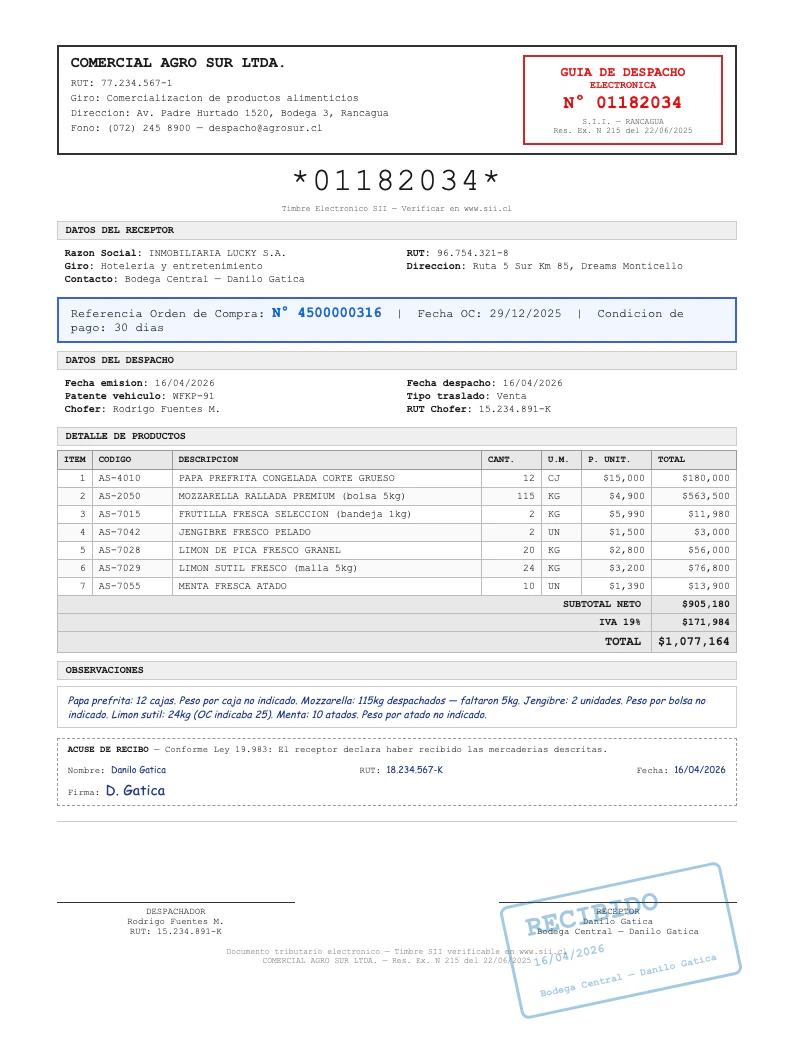 **Output: Warehouse Photo (verified)**
## Same Document, Different Nightmares
Every photo below was generated from the same clean PDF. Each preset targets a different real-world failure mode.
`full_picture` — clean handheld
**Output: Warehouse Photo (verified)**
## Same Document, Different Nightmares
Every photo below was generated from the same clean PDF. Each preset targets a different real-world failure mode.
`full_picture` — clean handheld
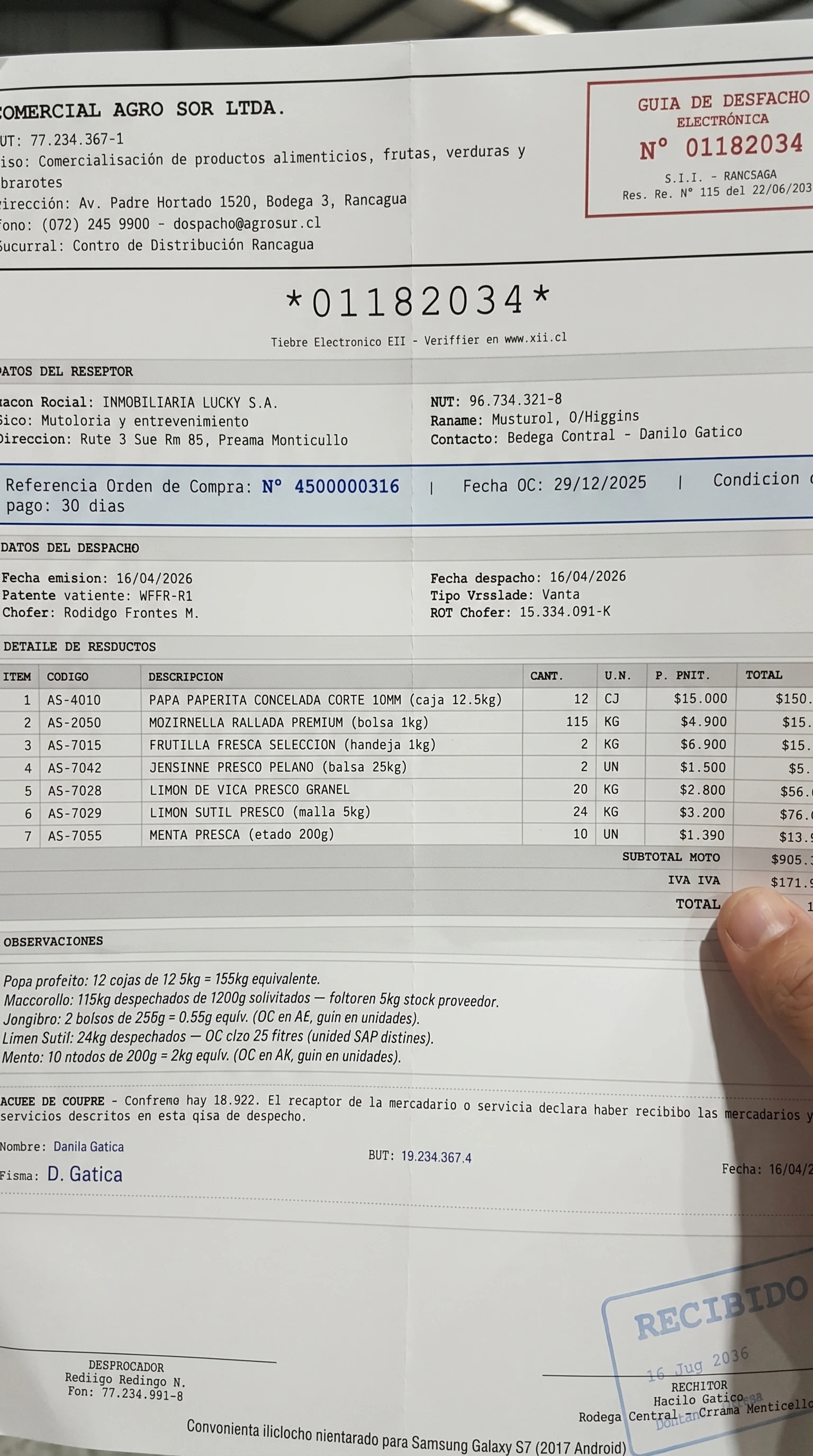 `folded_skewed` — dog-ear, crease, tilt
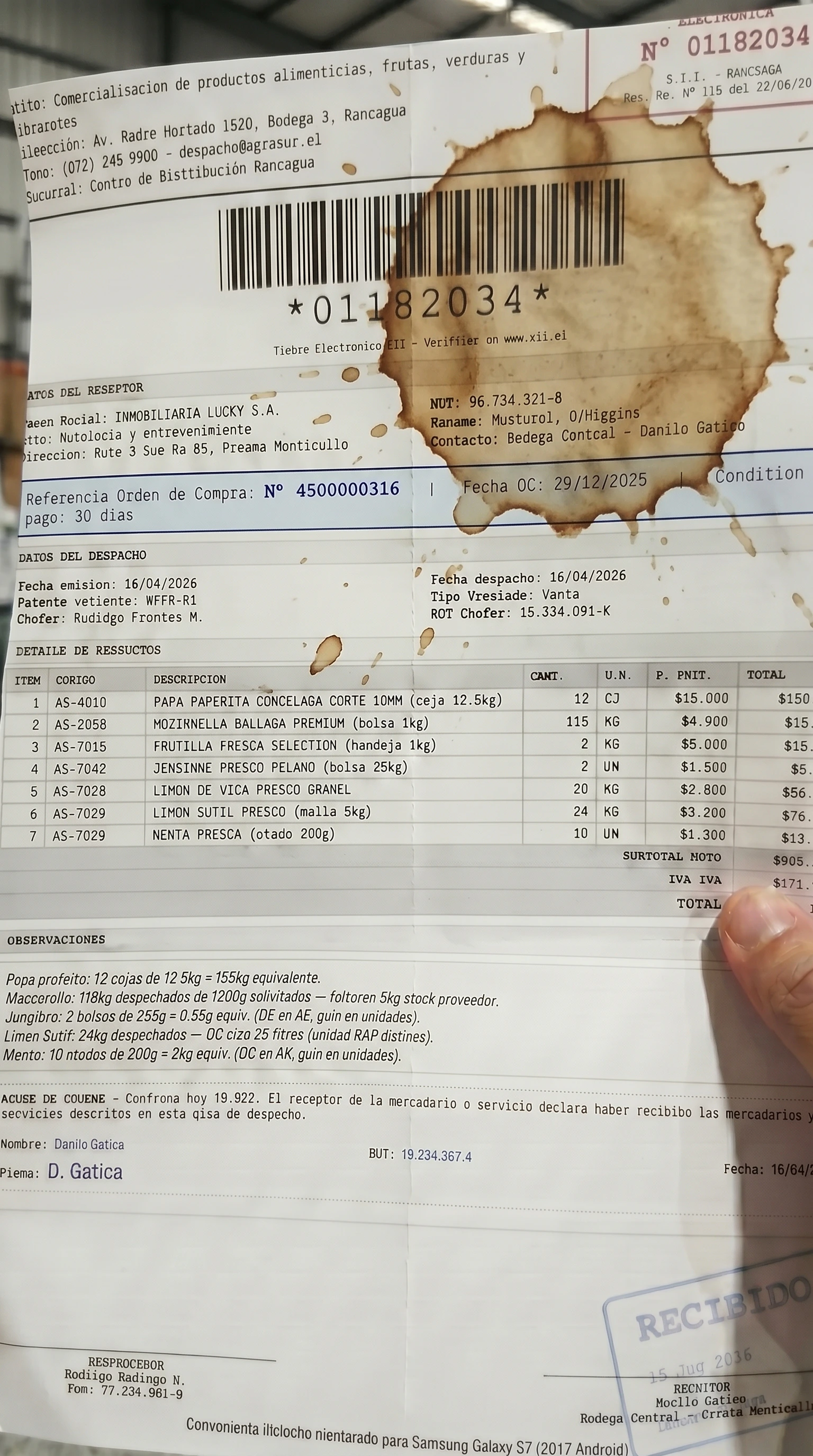 `coffee_stain` — stain over text
## How It Works
Provide structured data (JSON), upload a PDF/image, or just run `penquify demo`. Penquify generates a realistic document with supplier-style names (not your ERP master data names), unit mismatches, and configurable discrepancies.
Jinja2 HTML templates produce a pixel-perfect PDF. Dispatch guides, invoices, POs, BOLs — or bring your own template.
Each variation is sent to Gemini image generation with a fixed system instruction enforcing photorealistic operational capture. Camera model, paper deformation, stains — all configurable.
A separate vision model blindly extracts fields from the generated photo (it never sees the expected values). Python compares extracted vs source. Mismatches trigger retries with correction prompts.
If a variation intentionally hides data (crop, stain, fold), the manifest reports exactly which fields are affected: `"oc_number": "occluded_by_crop"`, `"item_3_qty": "obscured_by_stain"`.
## Quick Start
```bash theme={null}
pip install penquify
playwright install chromium
export GEMINI_API_KEY=your-key
# Full demo: document + 8 verified photo variations
penquify demo
# Upload any existing PDF
penquify upload --image invoice.pdf
# Describe what you want
penquify config --text "folded paper with grease, shot on old Motorola"
```
## Real Mismatches
The kind of discrepancies penquify generates — the same ones real supplier documents have:
| Dispatch Guide (supplier) | Purchase Order (ERP) | Challenge |
| --------------------------------- | ----------------------------------- | ------------------------------------------ |
| PAPA PREFRITA CONGELADA **12 CJ** | PAPAS FRITAS 10MM **150 KG** | Different name + unit. No weight per case. |
| MOZZARELLA RALLADA **115 KG** | QUESO MOZZARELLA RALLADO **120 KG** | Different name + 5kg short. |
| JENGIBRE FRESCO PELADO **2 UN** | JENGIBRE **0.5 KG** | UN vs KG. No weight per unit. |
| LIMON SUTIL FRESCO **24 KG** | LIMON SUTIL **25 L** | KG vs L + 1 unit short. |
| MENTA FRESCA ATADO **10 UN** | MENTA FRESCA **2 KG** | Atados vs KG. No weight per atado. |
## Open Source
MIT licensed. Self-host free forever. [GitHub →](https://github.com/MAXMARDONES/penquify)
`coffee_stain` — stain over text
## How It Works
Provide structured data (JSON), upload a PDF/image, or just run `penquify demo`. Penquify generates a realistic document with supplier-style names (not your ERP master data names), unit mismatches, and configurable discrepancies.
Jinja2 HTML templates produce a pixel-perfect PDF. Dispatch guides, invoices, POs, BOLs — or bring your own template.
Each variation is sent to Gemini image generation with a fixed system instruction enforcing photorealistic operational capture. Camera model, paper deformation, stains — all configurable.
A separate vision model blindly extracts fields from the generated photo (it never sees the expected values). Python compares extracted vs source. Mismatches trigger retries with correction prompts.
If a variation intentionally hides data (crop, stain, fold), the manifest reports exactly which fields are affected: `"oc_number": "occluded_by_crop"`, `"item_3_qty": "obscured_by_stain"`.
## Quick Start
```bash theme={null}
pip install penquify
playwright install chromium
export GEMINI_API_KEY=your-key
# Full demo: document + 8 verified photo variations
penquify demo
# Upload any existing PDF
penquify upload --image invoice.pdf
# Describe what you want
penquify config --text "folded paper with grease, shot on old Motorola"
```
## Real Mismatches
The kind of discrepancies penquify generates — the same ones real supplier documents have:
| Dispatch Guide (supplier) | Purchase Order (ERP) | Challenge |
| --------------------------------- | ----------------------------------- | ------------------------------------------ |
| PAPA PREFRITA CONGELADA **12 CJ** | PAPAS FRITAS 10MM **150 KG** | Different name + unit. No weight per case. |
| MOZZARELLA RALLADA **115 KG** | QUESO MOZZARELLA RALLADO **120 KG** | Different name + 5kg short. |
| JENGIBRE FRESCO PELADO **2 UN** | JENGIBRE **0.5 KG** | UN vs KG. No weight per unit. |
| LIMON SUTIL FRESCO **24 KG** | LIMON SUTIL **25 L** | KG vs L + 1 unit short. |
| MENTA FRESCA ATADO **10 UN** | MENTA FRESCA **2 KG** | Atados vs KG. No weight per atado. |
## Open Source
MIT licensed. Self-host free forever. [GitHub →](https://github.com/MAXMARDONES/penquify)